
IPG Open EdX Documentation

IPG Open EdX Documentation

  • Docs

›Server Tasks

Creating a Course

  • Create a New Online Course
  • Set Course Schedule & Details
  • Add Sections, Subsections & Units
  • Managing Unit and Component
  • Adding Videos
  • Adding HTML
  • Adding Discussions
  • Adding Problems

    • Adding Problems
    • Problem Types
    • Drag and Drop
    • Pointing on a picture
  • Adding Images and Figures
  • Uploading Static Content
  • Course Visibility
  • Creating pages
  • Grading
  • Commonly Used Advanced Settings

Running a Course

  • Managing Certificates
  • Common Instructor Dashboard Tasks
  • Managing Course Discussions

Advanced Management

  • Importing / Exporting Courses
  • Change a user’s password
  • Inactivate / Activate a User
  • Set a user to staff or superuser
  • Server Tasks

    • SSH into Server
    • Set or Change a Password
    • Add a microsite
    • Add a theme

Migration

  • Migrate EdX (Single-Server)
  • Migrate the Theme

Configuration

  • Enable and Update Additional Languages
  • Enable Downloads from Instructor tab in LMS
  • Configure and Enable Certificate
  • Configure Open Response Assessment

Set or Change a Password

If you need to change a users password (e.g. because they forgot and can’t change it via e-mail), then you can log into Linux and execute the following commands.

  1. Log into server.

  2. Execute the following commands.

    1. cd /edx/app/edxapp/edx-platform Edx platform

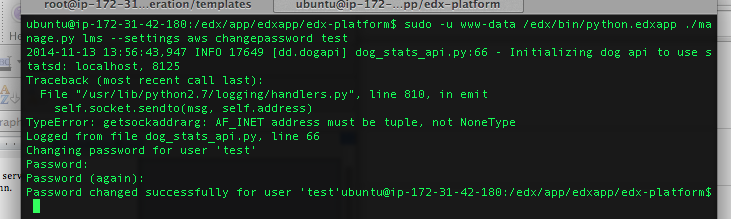
    2. sudo -u www-data /edx/bin/python.edxapp ./manage.py lms --settings aws changepassword test
      where test is replaced by the username of the user for which you are changing the password.

    3. When prompted, type in the new password and confirm it. Type new password
← SSH into ServerAdd a microsite →
IPG Open EdX Documentation
Docs
Create an Online Course
More
Curricu.me Website
Copyright © 2020 Todos los Derechos Reservados - IPG
