IPG Open EdX Documentation

IPG Open EdX Documentation

  • Docs

›Creating a Course

Creating a Course

  • Create a New Online Course
  • Set Course Schedule & Details
  • Add Sections, Subsections & Units
  • Managing Unit and Component
  • Adding Videos
  • Adding HTML
  • Adding Discussions
  • Adding Problems

    • Adding Problems
    • Problem Types
    • Drag and Drop
    • Pointing on a picture
  • Adding Images and Figures
  • Uploading Static Content
  • Course Visibility
  • Creating pages
  • Grading
  • Commonly Used Advanced Settings

Running a Course

  • Managing Certificates
  • Common Instructor Dashboard Tasks
  • Managing Course Discussions

Advanced Management

  • Importing / Exporting Courses
  • Change a user’s password
  • Inactivate / Activate a User
  • Set a user to staff or superuser
  • Server Tasks

    • SSH into Server
    • Set or Change a Password
    • Add a microsite
    • Add a theme

Migration

  • Migrate EdX (Single-Server)
  • Migrate the Theme

Configuration

  • Enable and Update Additional Languages
  • Enable Downloads from Instructor tab in LMS
  • Configure and Enable Certificate
  • Configure Open Response Assessment

Adding Discussions

Adding a Discussion

  1. Click the ‘Discussion’ component. Add a Dicussion

  2. An editable discussion component appears. Click ‘Edit’ in the top right. Edit

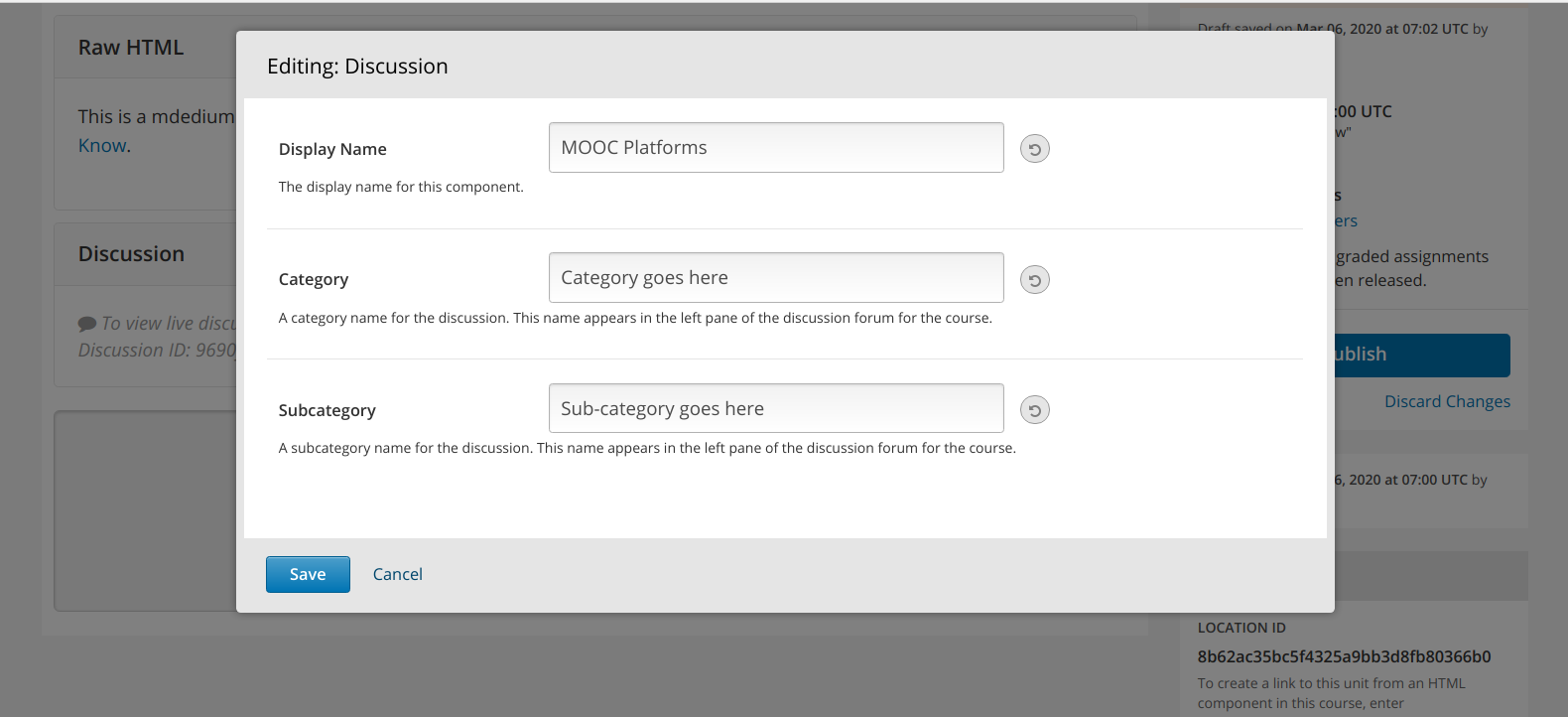
  3. Edit the following Components Edit Discussion

    1. Display name - This is displayed when a user mouses over the courseware unit that contains this component. E.G MOOC Platforms

    2. Category – Discussions in the discussion tab are organized by category. E.G Category goes here

    3. Sub-category – Within a category on the discussion tab, discussions are further organized by sub-categories. E.G Sub-category goes here

  4. Click Save to finalize your changes. Save

  5. Important Note: A conversation must be published and the Release Date must have passed in order to show up on the discussion tab. Discussion Tab
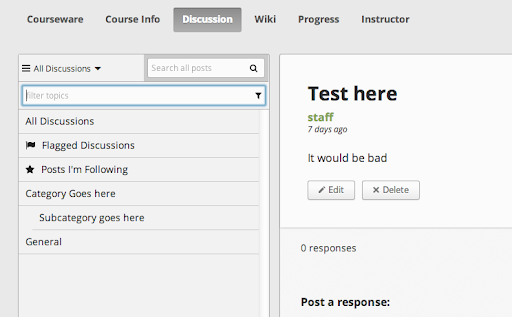
  6. A discussion block will show in the Unit in which it is added in and on the discussion forum unders category > sub category.

← Adding HTMLAdding Problems →
IPG Open EdX Documentation
Docs
Create an Online Course
More
Curricu.me Website
Copyright © 2020 Todos los Derechos Reservados - IPG